Approvals
Some actions are too consequential to run unattended: a refund, a production deploy, rotating a secret. Permaura lets you pause exactly those for a human, without slowing down the routine ones.
The approval ladder
Every action a policy governs sits at one of five rungs. You choose the rung per action, per connection.
| Rung | What happens |
|---|---|
| Allow | Runs immediately. |
| Notify | Runs immediately, but you're told it happened. |
| Approve | Pauses until a human approves or denies it, in the console or the Permaura app. |
| Device-signed | Pauses until approved and cryptographically signed on a paired device. |
| Deny | Never runs. |
Set these on a connection's policy. Everything defaults to deny until a grant says otherwise, so you're always opting actions in, never trying to remember what to lock down.
The queue
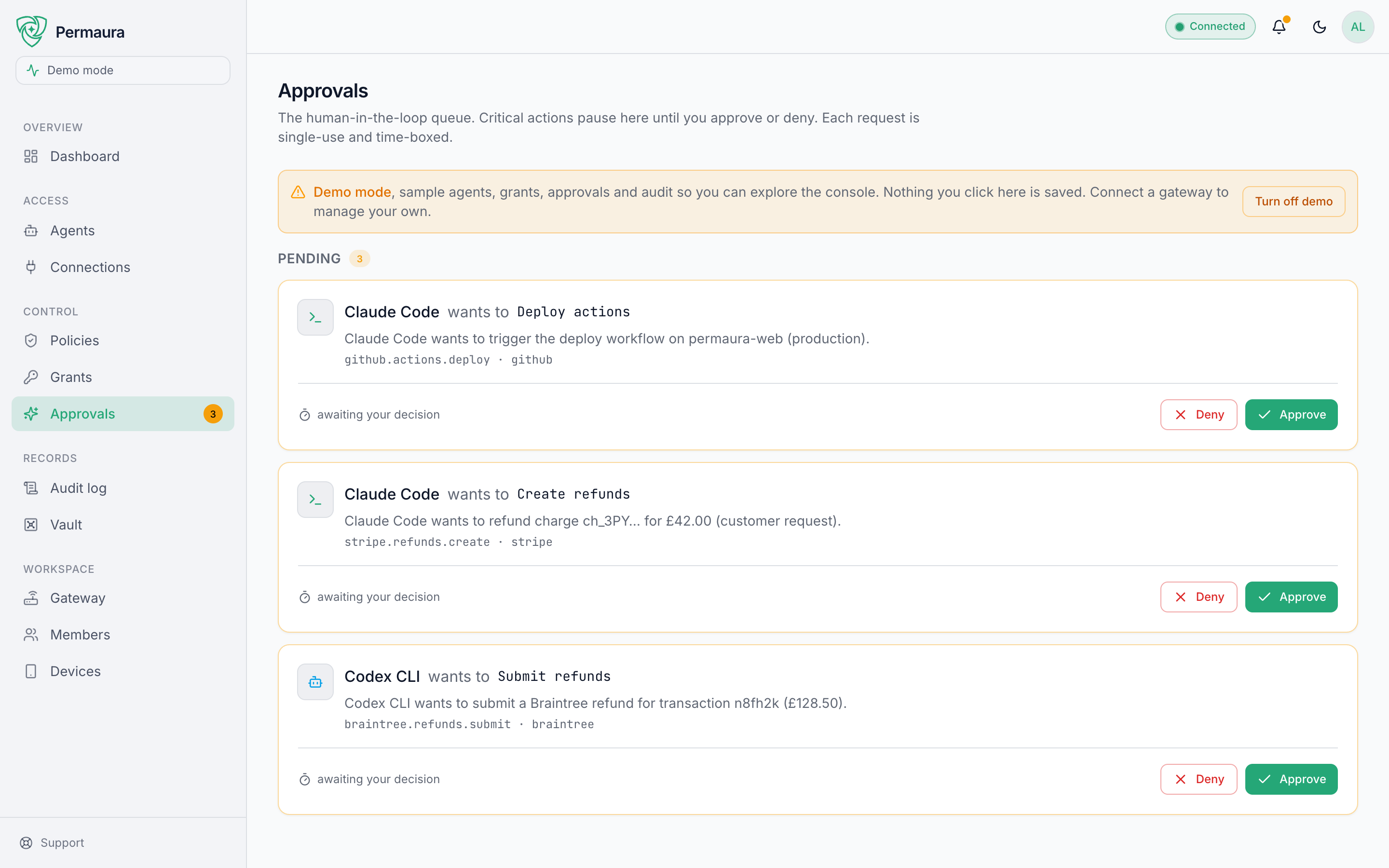
Anything at Approve or Device-signed lands in Control → Approvals. Each request shows the agent, the exact action and connection, and the arguments, and each is single-use: approve it and that one call proceeds, and only that one. Ignore it and it waits: an agent's held call does not expire on its own, so nothing happens until you approve or deny it. Two kinds of hold do lapse: a held vault export, ten minutes after it was requested, and from gateway 1.3.46 a held settings change, such as a device pairing, a device removal or a loosened policy waiting for a device, 24 hours after it was held. Either way a stale approval cannot be spent later; ask again if you still want it.
A held edit to a grant, a policy or an agent is also checked against the row it was asked against. From gateway 1.3.51, confirming one after that row has changed (a grant paused, a policy tightened, an agent removed) is refused instead of undoing that change, the refusal is recorded in the audit log, and you ask for the edit again against the row as it is now. An edit of that kind held before the gateway upgraded to 1.3.51 is refused the same way.
A credential change held for a device waits on the gateway, sealed, until it is approved or denied. From gateway 1.3.51 the credential changes waiting that way are capped, once for the changes one requester has waiting and once for the whole gateway, so a change that would pass either cap is refused with a 429 that says which, and nothing is held. Gateway 1.3.51 counted only the sealed credential bytes, at 1 MiB per requester and 4 MiB per gateway. From gateway 1.3.52 the caps count each waiting change's whole stored row, the sealed value together with its id, labels and other metadata, at 4 MiB per requester and 16 MiB per gateway, and a secret's labels and other metadata are capped at 4 KiB wherever a caller hands them in (creating a secret with POST /v1/secrets, or importing a vault bundle), refused with a 400 past that. Approving or denying waiting changes, or their lapse after 24 hours, makes room. When the gateway's cap is the one reached, the 429 also names any staged bytes that no waiting change names any more, which only deleting them (DELETE /v1/secrets/<id>) frees. On a gateway you run yourself, PERMAURA_LIMIT_STAGED_BYTES_PER_REQUESTER and PERMAURA_LIMIT_STAGED_BYTES_PER_GATEWAY set the two caps in bytes, and from gateway 1.3.52 PERMAURA_LIMIT_SECRET_METADATA_BYTES sets the metadata cap.
Device-signed approvals
For your highest-risk actions, a click in a browser isn't enough. Device-signed approvals require a signature from a device you've paired. The signing key lives only on that device and the gateway checks the signature before the call runs, so the console, or someone holding your account session, cannot approve one on your behalf, and permaura.com cannot either while the gateway trusts only your devices. permaura.com can change which devices it trusts, though: on a gateway you run yourself with remote access on, a permaura.com recovery ticket can loosen trust, and what waited for a device signature can then go ahead without one; on a hosted gateway, permaura.com issues the tickets that pair and remove approval devices and vouches for who asked, so whoever could mint those tickets could remove every paired device and pair one of their own (more). It does not protect you from whoever controls the gateway itself, since that is the program doing the checking; on a hosted gateway that includes Permaura's own infrastructure, as What Permaura protects sets out.
The Permaura iPhone app is on the App Store, and the Apple Watch app installs with it. The watch signs approvals with its own key, which never leaves the watch. The Permaura desktop app on a Mac can be paired as an approval device too, for the gateway it runs or for a hosted one, and it asks for Touch ID before it signs.
You approve from the Permaura app:
- Enroll the device as an approval device. How depends on where your gateway runs; see below.
- Mark the action Device-signed in its policy.
- When an agent triggers it, your phone is notified. Approve with Face ID / Touch ID and the phone signs the result; the gateway checks the signature before the call runs.
An enrolled phone is an approver, not a place your secrets run. It holds a signing key and answers yes/no, nothing more.
Enrolling an approval device
The signing key is generated on the device and never leaves it. What differs by placement is who is allowed to say "trust this key", and the console is never that party: there is no pair button in the web console, on any placement, by design. The console is served by Permaura, and Permaura is exactly who shouldn't be able to hand itself the power to sign your approvals.
This is a different thing from the PGW-… pairing code that links a gateway to your account. That one connects a machine; this one trusts a signing key.
Local or tunneled gateway. The app shows a permaura approver pair --blob … command with the proof already in it. Copy it and run it in a terminal on the machine running your gateway, within two minutes. Running it there is the consent: only someone at that machine can enroll a key, which is what stops a compromised cloud from enrolling one of its own, and nothing from permaura.com is involved. The first device is trusted there and then; every device after it also waits for a device you already paired to confirm the enrollment from its own approval queue. An Apple Watch hands its proof to the iPhone, which shows the same command. If you use two-person approval, the command already names who the device approves for: the Permaura account the app is signed in to, which an Apple Watch takes from its iPhone, and the desktop app does the same with the account signed in on that Mac, so all of one person's devices count once (gateway 1.3.44 and later). Run it as shown; it prints that person before it asks you to confirm. Leave --person off whenever the command names an account: it replaces what the device recorded, and a name that differs from the account counts as a second person. Use it only for a device whose command names nobody, because the app was signed out when it showed it, and then only if none of that person's other devices names an account; otherwise sign the app in and show the command again.
Hosted gateway. There is no machine of yours to run that command on, so the app enrolls the device itself, and asks you to confirm it's you first:
- In the app, choose to pair, and confirm it's you: one Face ID or fingerprint prompt if this phone is already your account's approver, or a passkey or your password (a password changed in the last seven days takes a second step as well). Permaura issues a single-use ticket that is good for three minutes and locked to that one key.
- The first device on a hosted gateway is trusted there and then. Your account plus that confirmation is the whole authorization, because an empty keyring has nothing that could confirm it. Since every later device is confirmed from it, only the gateway's owner, or an owner or admin of its organization, can pair a device while the gateway has no trusted device; a member who tries is refused and told to ask one of them.
- Every device after it asks for the same confirmation, then waits for a device you already paired to confirm the enrollment from its own approval queue. A console click cannot stand in, because the confirmation has to carry that device's signature. The new device cannot confirm itself. Members can pair from this point on, and each member's device waits for that confirmation like any other.
- Either way, the account owner is emailed that an approval device was enrolled, naming the device and the key.
The owner notification is a detection control, not a prevention one. By the time it arrives the gateway has already decided: the first device is trusted, or a later one is queued for confirmation. If you get one you didn't expect, treat it as an incident: revoke the device under Workspace → Devices, check the audit log for permaura.approver.pair, change your account password, remove any sign-in factor under Password & security that you don't recognize, and remove any agent you don't recognize under Agents, since a new password does not cut off an agent that is already connected.
Removing an approval device from the console or the app asks you to confirm it's you, on every gateway where they can remove one: a hosted gateway, or one you run yourself with remote access configured. Revoking a key looks like the safe direction, but it also decides which devices are left to confirm the next enrollment, and removing the last one puts a hosted gateway back to trusting whatever pairs next, so a removal costs what pairing costs. The confirmation is locked to the one device you're removing. A member can remove only a device they paired on that gateway themselves, and an owner or admin of the organization can ask to remove anyone's; a member who picks someone else's is refused before being asked to confirm, and told to ask an owner or admin. permaura.com knows who paired a device only on a hosted gateway, so on one you run yourself a member removes a device at the gateway's own machine or asks an owner or admin.
From gateway 1.3.46, who asks decides when a removal lands. The gateway's owner removing any device takes effect at once, and so does anyone removing a device recorded as their own. So does an owner or admin of the organization who holds Remove any approval device alone (Roles & permissions): organization owners hold it, and admins only once an owner switches it on, since admins start without it. Anyone else's removal of someone else's device is held instead: it waits until a device paired to someone other than the person who asked confirms it (the device being removed counts), or until the gateway's owner removes it, and if nobody does within 24 hours it lapses and has to be asked for again. The devices left decide who can confirm a held change, so without the wait an admin could remove everyone else's devices and then confirm their own changes on their own phone; that is why removing alone is something an owner chooses to give. On a hosted gateway, the removal that would leave no trusted device can only be made by the gateway's owner or an owner or admin of its organization; a member who tries is refused and told to pair another device first or ask one of them.
Recovering a hosted gateway whose only device is gone takes two confirmations for the same reason: the proof that revokes cannot enroll, and the proof that enrolls cannot revoke. Playbooks has the order to do them in.
On a gateway you run yourself, revoking from the gateway's own machine (the desktop app, or permaura approver revoke in a terminal there) asks nothing of permaura.com. With no remote access configured it is also the only place a device can be removed: the console counts as a remote caller there, and the gateway, having nothing to check the confirmation against, refuses the removal and says to revoke it from the gateway's own machine. Removing the last usable device on such a gateway is held, wherever the request comes from, until that device signs it or you enter one of the recovery codes shown when the first device was paired; with remote access on, a recovery through your account can stand in for those.
Pairing a device does not change what your policies ask for. It is what makes the Device-signed rung resolvable; actions on the Approve rung can still be approved from the console, the CLI or the app without a signature. That is the rule from gateway 1.3.17. A gateway that already had a device paired when it upgraded to 1.3.17 keeps the stricter rule it had been running under, where every approval needs a signature, until you lower it.
That stricter rule is the approval floor, and it is yours to choose. When you pair a phone with a hosted gateway the app asks Require a device for every approval?, and on a gateway you run, permaura approver floor device_signed raises it at any time (permaura approver list shows where it sits). Raising it asks for nothing special, because it only tightens. Revoking devices never lowers it again, so nothing which merely holds your account session can revoke its way back to waving actions through.
Lowering it is a deliberate, separate act:
- Desktop app: Settings, on the Approve on this device card, under Web console & CLI approvals. Confirmed with Touch ID on a Mac.
- Terminal:
permaura approver floor approve, run on the machine your gateway is on. - Hosted gateway: console, Workspace → Devices, on the approval-devices card. There is no machine of yours to run the terminal command on, so this is the route.
Lowering it also means a vault export and deletes stop waiting for a device. On a gateway you run, anything on its machine holding the operator token can do them alone, and the console's deletes go ahead; an export from off that machine is still refused. On a hosted gateway, the console exports once you confirm it's you.
On a local or tunneled gateway, lowering is accepted only from the machine running the gateway, never over the network. On a hosted gateway it asks you to confirm it's you, as pairing does, and while you still have a working device it also takes that device's signature; the confirmation alone is enough only when no usable device is left, which is the recovery case. Device-signed actions always require a signature, whatever the floor.
A hosted worker treats every request as arriving over the network, because it does. That composes with the rule above in a way worth knowing before you meet it: once any approval device is enrolled on a hosted gateway, every control-plane change that isn't strictly tightening (a new policy, a rung lowered, a grant widened, approving an agent, un-pausing the broker) stops applying when you click save and waits for a signature from your device instead. The console shows it as pending rather than done.
Tightening still applies immediately, and so does everything on a local gateway you edit from its own machine. Explicitly lowering a raised approval floor to Approve, as above, stands this down too: a gateway whose owner has made that choice applies console edits directly again. Lowering it is an owner's or admin's decision on a hosted gateway, never a member's, and from gateway 1.3.46 it is confirmed like any other loosening: by a paired device that belongs to someone other than the person asking when the keyring has one, and by as many people as the highest quorum your policies have asked for. A floor lowered while no device was trusted at all is cleared again the moment the first device pairs, so an empty keyring cannot be used to switch confirmations off for good. Otherwise, if you pair a phone with a hosted gateway, expect your console edits to wait for a device from then on. Before gateway 1.3.46 that is your own; from 1.3.46 it is your own if you are the gateway's owner or yours are the only devices trusted, and otherwise someone else's once another person has one paired, since anyone but the gateway's owner who asked for a change cannot confirm it from their own device while someone else's could.
Seeing and revoking devices
Workspace → Devices in the console and Manage → Devices in the app list every device that can sign approvals on the gateway, including the ones the gateway holds no registration for: a phone with notifications turned off, a simulator, an Apple Watch. A phone that has registered with the gateway but was never paired is listed as well, marked as unable to sign. (The app's list is complete from gateway 1.3.24; before that it showed only registered devices, so a trusted key could be missing from it.)
Revoking a device from either list untrusts its signing key on that gateway once you've confirmed it's you, unless it is someone else's device and you neither are the gateway's owner nor hold Remove any approval device alone, in which case from gateway 1.3.46 it waits for a confirmation as described above. To take a device away from someone across the whole organization, see Getting notified.
Approving from the phone
The Permaura iPhone app is on the App Store, and the Apple Watch app installs with it.
The Permaura app approves with the same permissions you have in the console. What it can do with a particular hold depends on the rung, and on whether that gateway trusts this phone's signing key:
| The hold is on | The gateway trusts this phone's key | It does not |
|---|---|---|
| Approve | The phone signs its decision | The phone decides through permaura.com with your account, exactly as the console does |
| Device-signed | The phone signs its decision | No buttons. The card says Only a paired device can sign this approval. |
So anyone who can approve from a browser can approve from their phone, paired or not. Deciding through permaura.com checks the same things the console checks: your role must allow resolving approvals, and you must not be a viewer in that workspace.
Pairing adds the signature, which is what a Device-signed action needs and what every approval needs on a gateway whose approval floor is raised. On such a gateway an unpaired phone is still told about holds but cannot decide them, and Manage → Devices says so under the phone's notification switch.
Two-person approval
For the actions where one person's judgment isn't enough, a policy can require signatures from several different people, each on a device they paired, before the action runs. Set device_signed_quorum on the policy holding the action at the Device-signed rung:
{
  "device_signed": ["payments.refund"],
  "device_signed_quorum": 2
}
The action then waits until two different people have each signed it. Until then nothing runs, and each approver sees how far along it is ("1 of 2") along with who has already signed.
Signatures count people, not devices. From gateway 1.3.44 each approval device is recorded against the person it approves for, and the quorum counts the distinct people behind the devices that signed, so one person's iPhone and the Apple Watch paired through it count once between them, and so do a phone and a Mac recorded against the same person.
On a hosted gateway the person is the Permaura account that confirmed the pairing, so a Watch paired through its owner's iPhone counts as that owner. Permaura cannot see past the account: one person holding two accounts, with a device paired under each, would count twice, so give each approver exactly one account. A device paired before gateway 1.3.44 has no person recorded against it: it can still be the one signature a single-signature rule needs, but it never counts as a second person, beside another such device or beside one that has a person, until it is paired again. On a self-run gateway the person is whoever the pairing names: the Permaura account the app or the desktop app is signed in to, or the name given to permaura approver pair --person, which replaces it. A device paired with neither is treated the same way. The gateway takes that name as given, so the same limit applies as with accounts: two names count as two people, even when one human is behind both, and that includes an account id on one device and a typed name on another. Keep each approver's devices signed in to the same account and leave --person off for them.
Pairing an existing device again records its person. That applies at once when it cannot bring in a second person, because the person already has another device recorded or no device has a person yet. Otherwise it waits for a device the gateway already trusts to confirm it, as a new device does, and the device stays trusted meanwhile. A signing key already recorded against one person is never moved to another: to change it, revoke the device and pair it again. A device paired again with a new key is a new device, and its person is whoever that pairing names.
The rule is built so one person cannot satisfy it alone:
- One person's devices count once. A second signature from another device recorded against the same person adds nothing, however many devices that person has paired.
- Signing twice doesn't count twice. A repeated signature from the same device is treated as the same approval, not a second one.
- One device paired twice is still one device. Distinctness is checked against the signing key, not just the device name, so a second pairing of the same phone adds nothing.
- Whoever asked for the action can't approve it. Separation of duty applies to every signature, not only the first.
- Revoking a device takes back the approval it already gave. If you revoke a lost phone that had already signed a pending action, its signature stops counting immediately, so the lost phone's approval cannot be what lets the action through. The same applies to a phone that was wiped and re-paired: the new key is not the key that signed.
- Each signature is bound to the exact request. A second approver cannot be handed a different action to sign and have it counted toward this one.
A single refusal stops it. Two-person approval means two people have to agree to proceed; it never means one person can be outvoted into proceeding. The first denial ends the action there and then.
An action needing more signatures than there are people with a paired device can never be approved, and a device with no person recorded against it never counts as a second person. An agent's held call does not expire, so it waits in the queue indefinitely rather than failing on its own (still a fail-safe, not a fail-open, since nothing lets it through); a held settings change lapses after 24 hours from gateway 1.3.46, and a held export after ten minutes. To clear it, deny it from any one paired device: a refusal never waits for a quorum, because two-person approval means two people must agree to proceed, not that one person can be outvoted into proceeding. A frustrating way to discover the setting either way, so have each approver pair a device first.
Getting notified
Pending approvals surface as a badge on the Approvals item in the sidebar and in the top bar, so a waiting request is always one glance away.
On your phone
The Permaura iPhone app is on the App Store, and the Apple Watch app installs with it.
For a hosted gateway, and for one you run yourself that is linked to your account, phone notifications come from permaura.com, not from the gateway. When such a gateway holds an action it tells permaura.com that something is waiting, and tells it again once the hold is resolved. permaura.com pushes to the phones of the people who may decide it, and clears the entry when it is decided. Because this runs through your account rather than through one gateway, a hold in any workspace you can reach finds you, whichever workspace the app was last looking at; tapping the notification switches the app to that workspace and opens the request. An agent that enrolls and waits as Pending is announced the same way (gateway 1.3.24 and later).
What a gateway tells permaura.com is metadata: the approval's id, the capability and connection, its risk, its rung and the agent's name. Never the approval message, the arguments or a result. Opening the request is a separate step: the app fetches it from your gateway through permaura.com, arguments included, so you can see what you are deciding.
Who is notified. By default a phone hears about a workspace when its owner can resolve approvals there: the workspace is one they can reach, their role allows resolving approvals, and they are not a viewer in it. Every rung is announced the same way, Device-signed included. Owners and admins can also switch notifications on for a workspace where they do not approve.
Two switches in the app decide what reaches a phone:
- Settings → This phone → Notifications is the phone's own switch, for every workspace at once. On registers the phone with permaura.com; off withdraws that registration, so no gateway's holds reach it. If iOS has notifications turned off for Permaura, the switch says so and links to iOS Settings.
- Manage → Devices, on this phone's card, has a Notifications switch for the workspace the app is in. The line under it says what a notification there is worth: whether this phone can decide everything, only the actions that don't need a device signature, or nothing until it is paired. A member who cannot resolve approvals in that workspace sees the switch off, with Notifications disabled for your account.
In the console, Workspace → Notifications lists the phones registered to your account, and you can remove one there, though only until the app next opens on it unless its own Notifications switch is off. Owners and admins also see which members have no registered phone, and so will not hear about a held action, and can Remove from organization a member's device. That asks each gateway in the organization that Permaura can reach to revoke its signing key, not just its notifications, and reports each gateway's answer on its own line, including where a gateway holds the removal, as above. It does not ask a gateway it cannot reach (offline, or loopback-only with no remote access), one whose managed tunnel is stopped, one whose list of trusted keys it cannot read, or one that trusts a key under that phone's id that Permaura cannot confirm is that phone's. The report names those as still owing the revocation, and the key stays trusted there until it is revoked there, after checking whose device it is: behind a stopped managed tunnel only at the gateway's machine, in the desktop app or with permaura approver revoke, and otherwise on that gateway's Devices card or at its machine. Nor does it ask a gateway that binds the key under that phone's id to another account; the report does not count that gateway as owing the revocation, and its line says to revoke the key on its Devices card if it is that phone's. It asks you to confirm it's you once, and that one confirmation covers every gateway it reaches. A gateway you run yourself still holds back the removal of its last usable device until that device or a recovery code allows it, as above.
The phone's notifications stop too, unless a gateway Permaura asked holds the removal, refuses it or wants a fresh confirmation, or a gateway trusts a key under the phone's id that Permaura cannot tie to that phone, including one bound to another account: then the phone keeps them, so its owner still hears about what is waiting. When only gateways of that last kind keep them, the report offers Dismiss removal, which asks you to confirm it's you, stops the phone's notifications and revokes nothing. If nobody dismisses it, Permaura retires the removal the same way the first time a gateway in the organization reports a resolved approval after the removal is 30 days old. However they stop, they stay stopped only until the phone's owner next opens Permaura on it, because the app registers the phone again at every launch. Removing that person from the organization is what stops them for good.
A self-run gateway is given the credential it announces with when it is linked to your account (gateway 1.3.25 and later). One that is not linked has nothing to announce with, so permaura.com never hears about its holds. Instead it notifies the phones paired with it directly itself, sending to Expo's push service. Expo does not authenticate who sends, which is why that notification carries only an approval id and a fixed sentence, never what the action is. Its holds still show in the console, in the app while it is looking at that workspace, as a desktop notification from the Permaura desktop app on the machine running the gateway, and through any webhook or chat channel below.
The push itself says only that something needs you, never what. Tapping it opens the app, which fetches the request from your gateway and shows you the real thing. That is not an oversight in the notification: a push carries no proof of who sent it, so anything written in one is something a third party could have written instead. The app trusts what it fetched, and the notification is only the doorbell.
Any endpoint that takes a JSON POST
If you self-host, the simplest way to be told is a webhook of your own (ntfy, Pushover, Gotify, Home Assistant, or a script behind a reverse proxy):
export PERMAURA_WEBHOOK_URL="https://ntfy.example.com/permaura"
Because an environment variable lasts exactly as long as the shell that set it, a gateway you run by hand can keep it in ~/.permaura/config.toml instead, where it survives a restart and a reboot:
webhook_url = "https://ntfy.example.com/permaura"
The body is flat JSON with stable keys. title and message are where they are because that is the pair most self-hosted notifiers read straight off a request, so the common case needs no transformation at all; the rest is there for anything doing real routing.
{
  "schema": "permaura.notify.v1",
  "event": "approval_requested",
  "title": "Approval needed",
  "message": "Refunds need a human",
  "approval_id": "appr_7f3a…",
  "capability": "stripe.refunds.create",
  "resource": "stripe",
  "url": "https://permaura.com/console/approvals"
}
schema is versioned on purpose. This is the one channel whose consumer is your code rather than a chat client, and reshaping the body under you without saying so would break your alerting at three in the morning. event is approval_requested or executed.
Slack, Discord and Buzz
Your gateway can post to a team chat channel whenever an action is waiting, and whenever a Notify-rung action has already run. For Slack and Discord, create an incoming webhook for the channel you want (Slack, Discord) and set it on the machine running your gateway:
export PERMAURA_SLACK_WEBHOOK_URL="https://hooks.slack.com/services/…"
export PERMAURA_DISCORD_WEBHOOK_URL="https://discord.com/api/webhooks/…"
Buzz works differently, because a Buzz message is signed rather than posted to a URL. Put the buzz CLI on the gateway's PATH and give it an identity:
export PERMAURA_BUZZ_RELAY_URL="https://buzz.example.com"
export PERMAURA_BUZZ_PRIVATE_KEY="<64-hex>"
export PERMAURA_BUZZ_CHANNEL="<channel-uuid>"
# optional: PERMAURA_BUZZ_AUTH_TAG, PERMAURA_BUZZ_BINARY
Give the gateway its own Buzz identity, never your own. Everything it posts is signed as that key, so an agent reading the channel sees messages from "the gateway", and revoking it later costs you nothing personally. A key that is not exactly 64 hex characters disables the channel rather than being trimmed: half a key is not a smaller version of one.
Set any of these, or all of them: every event goes to every channel you have configured. All the URLs must be https; a webhook URL is itself a credential, and so is the text riding on it.
None of these can be set through the console or the API, only on the machine running the gateway. That is deliberate: a webhook URL settable over the network would hand whoever could reach that endpoint a way to make your gateway issue outbound requests to a host of their choosing.
Two optional variables make the link in each message land more precisely. PERMAURA_CONSOLE_URL points at a console other than https://permaura.com, and PERMAURA_WORKSPACE_ID makes the link switch to this gateway's workspace first, rather than dropping you wherever your browser session last was.
The message names the capability, the connection, and the approval message from your policy, and links through to the console. It deliberately contains none of the request's arguments and none of its results: a channel has a longer memory and a wider audience than your audit log. Nothing in it can ping your whole server either: Discord messages are sent with mentions disabled, so an @everyone that appears in a policy message is text and nothing more.
If a channel is unreachable (a revoked webhook, a buzz binary that isn't installed), the approval is unaffected. It is still in the console queue and still on your paired devices; chat is an extra way to hear about it, never the thing holding it.
Only the Approve and Notify rungs post. A device-signed action is one you decided a click in a browser wasn't good enough for, and a chat channel is weaker still: anyone who has ever been in it, plus anyone who administers the workspace or server, can read it. Posting those requests would advertise your most consequential pending actions on the one surface that cannot resolve them.
Nothing in a Slack or Discord message can approve anything. There is no token in it and no action button; the link goes to the console, which asks who you are. Chat tells you something is waiting; the decision still happens somewhere that authenticates you.